
Welcome back, BrainBuffet teachers and license managers!
We’re so excited to start another school year with you and your students!
We know the start of a school year is BUSY.
To help you get up and running quickly and without unnecessary frustration, we’ve created a series of short tutorial videos covering everything you need to know to get started with BrainBuffet.
🚀 A Few Minutes Now = A Much Smoother School Year
Please watch them before you start setting up your classroom. We want you and your students to have an amazing BrainBuffet experience, and these videos are the fastest way to get there!
So grab your coffee ☕, take a few minutes, and watch the tutorials.
💻 If you prefer to join our next LIVE trainings, just sign up here!
1️⃣ START HERE — Licenses & Student Seats
👉Please watch this video FIRST. You cannot move on successfully without understanding this step.
ALL License Managers AND Teachers must watch this video.
This is the mandatory first step because everything starts with licenses.
One license = one student seat.
Before a teacher can create a classroom, a License Manager must assign licenses to that teacher.
Remember:
- One license = one student seat
- Only a License Manager can give licenses to a teacher
- Teachers must receive their licenses before creating a classroom
2️⃣ Create Your Classroom
Once you have received your licenses, this video will show you how to create your classroom.
It’s the next step in getting your students ready to learn.
Important: You must have your licenses before creating your classroom.
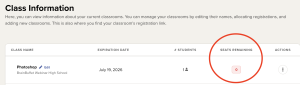
⭐ 3️⃣ VERY IMPORTANT — Check Your Remaining Seats!
Teachers: PLEASE watch this one!
This is one of the most important things to understand when managing your students:
You MUST have available student seats.
Before adding students or sending them your classroom link, always check your remaining seats.
If you have no remaining seats:
- Students cannot successfully join your classroom
- Your student roster will not work
- Students will get an error message when they use the classroom link
👇No remaining seats = no available spot for another student.
4️⃣ Instructor Files — Get More From Your BrainBuffet Courses
Did you know your BrainBuffet courses include Instructor Files?
This video shows you what the Instructor Files are, where to find them, and how to use them to get the most out of your course.
5️⃣ See the Courses From Your Student’s Point of View
This video walks you through the student experience, including how students:
📁 Find their project files
🎬 Watch the video lessons
❓ Answer the pop-up questions
📝 Complete assessments
🏆 Progress through the course
✅ Earn their course completion and certificate
6️⃣ Track Your Students’ Progress
Once your students are working, you’ll want to know how they’re doing.
This video shows teachers how to view student course progression, including:
📺 Which videos students have watched
📊 Their scores
🔄 The number of assessment attempts
📈 Their overall course progress
📥 How to download a CSV report for the entire classroom
7️⃣ Need Help? Here’s How to Reach BB Support
And yes , we’re always here to help! 💙
This final video shows you exactly how to contact BrainBuffet Support, whether you need to use our live chat or create a support ticket.
💡Remember, we have two extra LIVE training sessions. You can register by clicking here.
Wishing you an amazing school year ahead!
Welcome back, and happy teaching! 💙